
Is there an official Stake app?
Yes, but not everywhere: an iOS app published by Stake.com exists in some App Store regions, and on any phone the site works as a web app. Stake’s casino page, read in November 2026, presents stake.com as a progressive web app (PWA) that you add to your home screen from your mobile browser. The App Store listing names Medium Rare N.V., the company that runs stake.com, as seller.
In our checks in November 2026, the stake.com footer had no app store link, and Stake’s help centre had no article about a store app. On Android, we found no Stake app on Google Play. Before you install any app that uses Stake’s name, check that its publisher is Stake.com.
On Android, and wherever the iOS app is not listed, the Stake app is the site itself. Open stake.com in your phone’s browser and sign in to the same account, with the same balance, casino games and sportsbook. Nothing has to be downloaded, and the home-screen icon opens Stake like any other app.
| Point | Stake web app | APK or app not published by Stake.com |
|---|---|---|
| Where it comes from | stake.com, in your own browser | Not linked to Stake.com by any official source we read |
| What you install | A home-screen icon | A file or app you cannot trace back to Stake.com |
| Stake’s position | Described on Stake’s casino and sports pages | Only Stake’s iOS app lists Stake.com as publisher |
| Our advice | Use it | Do not install it |
How to add Stake to your home screen
You add Stake to your home screen from your browser’s menu, in three taps. You get an icon that opens Stake like an app, and nothing is installed from outside your browser.
On Android (Chrome)
- Open stake.com in Chrome and sign in.
- Tap the three dots at the top right.
- Tap Add to Home screen, then confirm.
On iPhone and iPad (Safari)
- Open stake.com in Safari and sign in.
- Tap the Share button.
- Tap Add to Home Screen, then Add.
Is a Stake APK safe to download?
No. Since we found no Android app from Stake, a file offered as the “Stake APK” or “Stake app download” does not come from Stake, and we found no official source linking one to Stake.com. Do not install it, and never enter your Stake details or 2FA codes in it: your account and your crypto could be at risk.
Watch the publisher. Some apps use Stake’s name without coming from Stake: on Google Play, for example, a “Stake casino” game from another publisher offers no real money and is not Stake’s. On the App Store, Stake’s own app lists Stake.com as publisher.
Leave at once if you meet any of these signs:
- An install file. Stake’s own method needs no file at all.
- An address other than stake.com in the browser or in the link you were sent.
- A request for your password, 2FA code or QR code by message.
- A promise of wins, predictions or a special version. No app can predict a game result.
What can you do on Stake from your phone?
You can do almost everything from your phone: Stake says you can sign in, pay and place bets there, with one account for the casino, the poker room and the sportsbook.
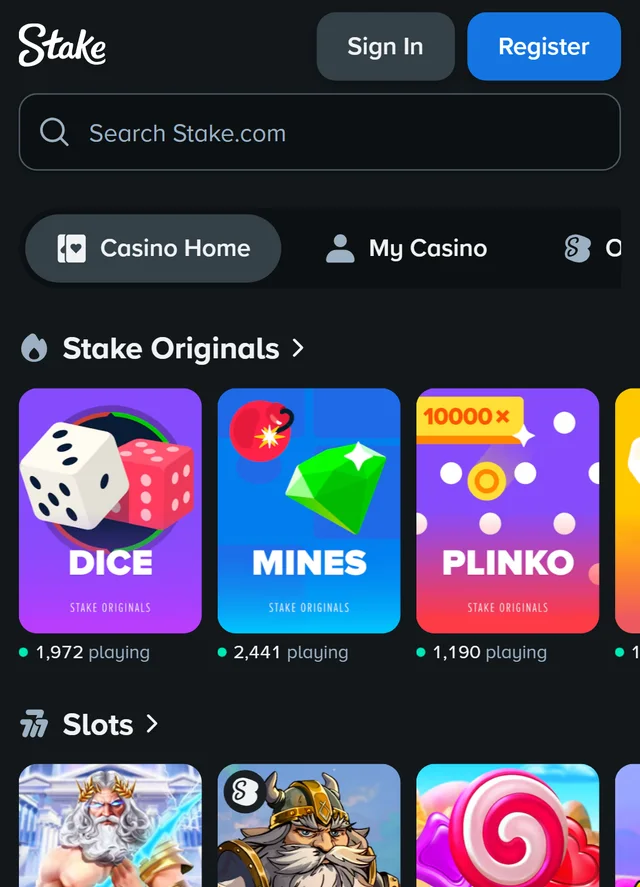
- Casino games. Slots, live tables and the Stake Originals, which Stake says run on Apple and Android devices. See our Stake games guide.
- Sports betting. The same markets and bet types, with free live streams on selected events once signed in. See our Stake sportsbook guide.
- Wallet and Vault. Deposits, withdrawals and the Vault work from the phone. Copy addresses with care on a small screen, and check the network before you send.
- Poker. Keep Stake Poker in one tab on one device: opening it elsewhere closes your active tables. You can play up to 6 tables at once.
- Security and limits. 2FA, passkeys and the Stake Smart limits are in your settings, as on a computer.
Stake’s terms note that the mobile layout can differ slightly because of the smaller screen: some information moves, and game names may not show on every game page. Your own connection and data plan also apply.
Stake not working on your phone? What to try
Stake’s help centre points to the browser data first. Try these in order:
- Clear cache and cookies. In Chrome on Android: three dots, Settings, Privacy, Clear browsing data. On iPhone: Settings, Safari, Advanced, Website Data.
- Reload stake.com and sign in again.
- If a game froze, reopen it with the same coin pair. Stake says interrupted features are not lost.
- Try another browser or device.
- Contact Stake support by live chat once signed in, or at support@stake.com.
Keep your Stake account safe on your phone
- Always check that the address is stake.com before you sign in.
- Turn on two-factor authentication, or add a passkey to sign in with your phone’s biometrics.
- Never share a code received by email or from your authenticator app. Stake’s security emails come from noreply@stake.com.
Sign-in methods and account recovery are covered in our Stake login guide.
Getting started on mobile
You can create your account from your phone: an email address, a username and a password, or a Google account. Our Stake sign up guide shows each step.